Tax
Estimate the tax due on your realized gains and investment income, computed from the transactions you've logged. The engine matches every sale against what you originally paid (cost basis), totals the gains per year, and applies separate rates to capital gains, income (dividends and rewards), and interest, like a lightweight Koinly that runs on your own ledger.
These figures are estimates, not tax advice. The jurisdiction presets are editable suggestions; check the rates and rules that apply to you.
How to use
- Open Settings → Tax, pick the Portfolio you're configuring, then its Jurisdiction. The preset pre-fills the cost-basis method, the three rates (capital gains, income, interest), the annual exemption, the exemption carry-forward (for Belgium: unused exemption adds 1,000 euro per year, for up to five years), and (for Belgium) the basis-reset date. Adjust anything, then save. Tax is set per portfolio: each defines its own rules, and a portfolio isn't taxed until you configure it. For a company portfolio, pick Belgium (company), which fills the corporate rate (25%) with no personal exemption.
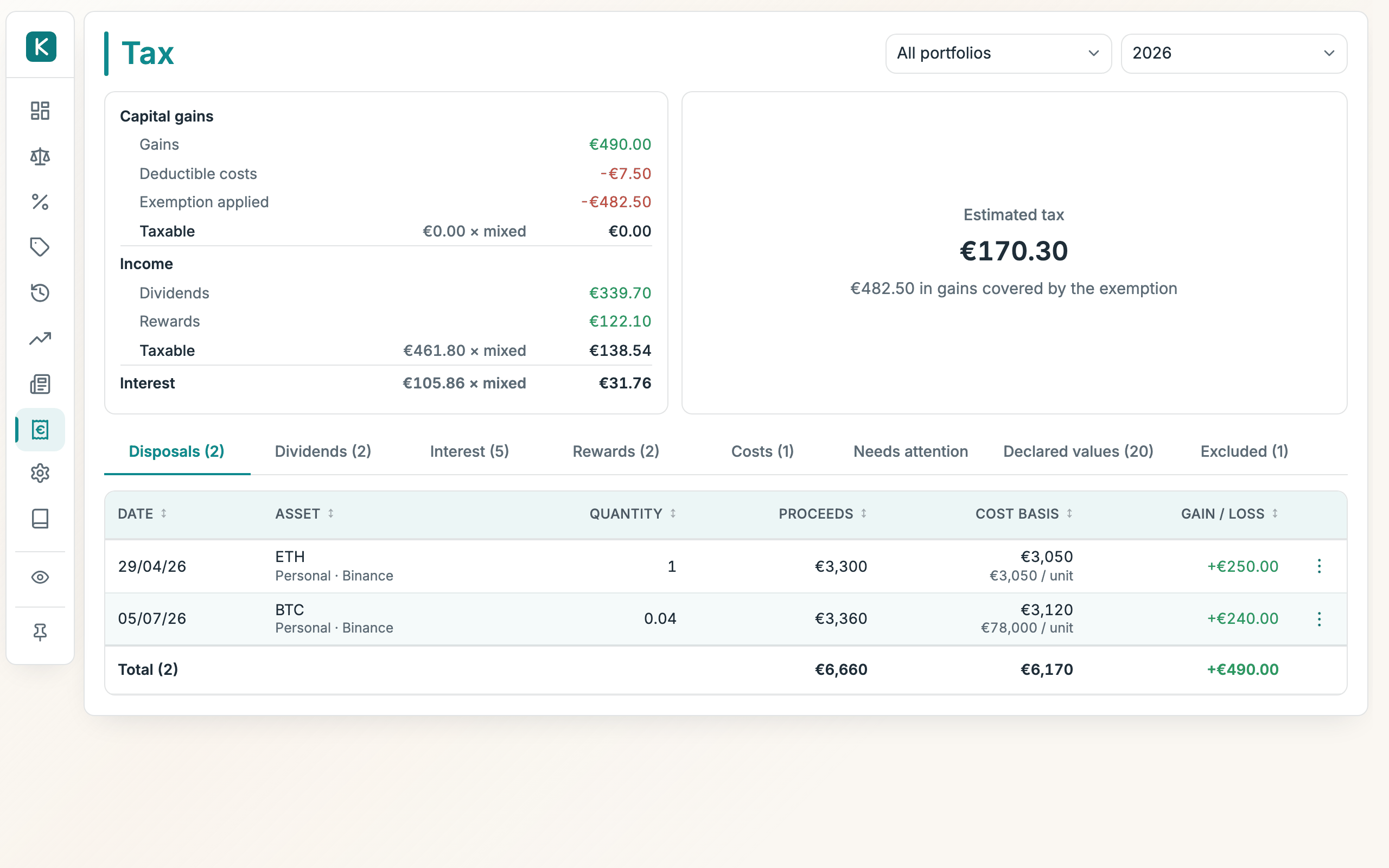
- Open the Tax tab and pick a year. The Estimated tax table breaks the total down by category (capital gains, income, and interest) each as its taxable base × its own rate; under capital gains it shows the build-up (gains − losses − exemption = the balance eligible for tax).
- When more than one portfolio is configured, a portfolio filter appears next to the year. Pick one to see its tax at its own rates, or All portfolios to sum them. Where portfolios tax a category differently, that rate shows as mixed but the totals are still exact.
- Review the Disposals table: one row per sale, with proceeds, cost basis, and the resulting gain or loss.
- Fix anything under Needs attention (see below) so the estimate uses real purchase costs instead of worst-case ones.
Where the numbers come from
Every trade you log carries its € value, so the engine can replay your full history:
- Buying an asset records what it cost you.
- Selling realizes a gain: the sale's € value minus the cost of the units sold, matched FIFO (oldest units first) or by weighted average (one average price per holding), per your setting. The Belgium preset uses FIFO, as Belgian law prescribes for identical assets bought at different prices. A Belgian portfolio set up before this change keeps the method it saved; switch it in Settings → Tax.
- Swapping one asset for another (e.g. BTC → ETH) counts as selling the first at the trade's € value and buying the second, unless swaps are set to non-taxable, in which case the old cost carries over.
- Cash has no cost basis. Cash's cost is always its face value, so it can't realize a capital gain: cash positions never enter the basis matching, and their register shows — instead of a basis trail. What cash earns (interest) is taxed as income when credited, via the interest tag.
- The History tab shows each transaction's tax effect in the Gain column.
Tagging a transaction
Not every trade is a taxable sale. The row menu (⋮) on the History tab offers these tags:
- Exclude from tax: for transfers between your own accounts and other non-events. The row stays visible but greyed, so nothing disappears silently.
- Tag as lost / stolen: for coins lost or stolen (a hack, a wrong address, a defunct exchange). On an adjustment row, the units are disposed of at €0 proceeds, so their remaining cost basis is realized as a capital loss (the opposite of Exclude, which suppresses gain and loss). To record one, reduce the holding by the lost amount (a withdrawal adjustment) and tag it. Whether such a loss is deductible depends on your jurisdiction; exclude it instead where it isn't.
- Tag as interest / Tag as dividend / Tag as reward: the row's € value is reported as that year's income instead of a gain, under the Tax tab's Interest, Dividends, and Rewards sections, ready for your declaration. Interest is taxed at the interest rate; dividends and income-treated rewards at the income rate, both set in Settings → Tax, and both feeding the Estimated tax breakdown. Whether rewards get their own section (income rate) or report under Interest (interest rate) is a Settings → Tax choice. A tagged purchase (a reinvested dividend) still counts as a normal buy for later gains.
- Tag as cost: for fees and charges (advisory costs, subscription fees, transaction costs). The row's € value lands under the Tax tab's Costs section and is subtracted from the year's net gain before the exemption; the row itself never realizes a gain. Whether such costs are actually deductible depends on your jurisdiction; treat the figure as an estimate.
The same row menu (edit, delete, tag) is available on the rows of the Tax tab's Disposals, Dividends, and Interest sections, so corrections can be made where you spot them.
Excluding a whole position
To keep an entire holding out of the tax report (a car, a collectible, anything out of scope), use the eye-off button on its row under Needs attention. Excluded positions live in the Excluded section and can be re-included anytime; their transactions show a "position excluded" marker in History.
Tax exclusion is independent of the Balance sheet's count in P/L toggle: one keeps a position out of the tax report, the other only out of the P/L cards. A line can be excluded from P/L yet fully taxable (a cash account whose interest is income), or shown in P/L while its tax is handled elsewhere.
Unknown purchase costs
Positions that arrived without a price (synced balances, quantity corrections, or holdings imported without an invested amount) have no known cost. They count at zero cost, so the estimate errs high, never low, and the position is flagged with a no basis warning.
Quantity adjustments carry a € value: new incoming adjustments are priced automatically at the ticker's latest cached € price when they're created (sync refreshes, manual quantity edits), so most never warn at all. To set or correct one, use Set € value in the adjustment's row menu (or click its chip), the same dialog as declarations, with the row's date locked in.
The value you enter is the cost basis of those units: what they cost you, not merely their market value. The dialog suggests the market close on the row's date as a convenience, but what to enter depends on how the units arrived:
- Bought (a late-synced purchase): enter what you paid.
- Received free (a staking reward, airdrop): the cost basis is the market value at receipt, so take the suggested price and tag the row as reward, which also books that value as income for the year. That way the same figure is both taxed as income now and used as the basis when you later sell.
- Truly free with no income event: enter 0. A later sale then realizes the full proceeds as gain.
Tagging an adjustment as income also settles its basis by itself: the tag means "these units were free", so the unknown-cost warning clears even without a value: the units carry a basis of €0 (a later sale realizes the full proceeds) and the income section shows €0 until you price it.
Auto-tag rules save you from tagging every drip by hand. From an adjustment's row menu in History, pick Always tag like this… to create a rule for that exact position: a tag (reward, interest, dividend, or cost) and a quantity ceiling. From then on, any adjustment on that position at or below the ceiling is tagged automatically the moment it's created (including nightly sync refreshes); income tags match units arriving, cost matches units leaving. Creating a rule also sweeps the position's existing untagged adjustments and tags the matches, with an Undo if it caught more than you meant. A manual tag always wins: rules never touch a row that's already tagged. Rules are listed and removable under Settings → Tax → Auto-tag rules; deleting one stops future auto-tagging but leaves the tags it already applied.
To fix it, use Set opening value (from the warning, or the no basis chip in History) and declare what the position was worth on a chosen date. From that date the declared value is the position's cost basis.
The value can be entered per unit (the market price you look up; the engine multiplies by the quantity held on that date) or for the whole position, and in the instrument's quote currency. Foreign-currency values convert to € at the ECB reference rate of the as-of date (falling back to today's rate if the fixing can't be fetched; the hint says which rate was used).
You don't need a warning to declare a value: any holding's row menu on the Balance sheet (⋮ → Set cost basis…) opens the same dialog, defaulting to the reset-photo date. Use it when a position's cost basis is wrong even though it isn't flagged, e.g. a partly-sold holding whose invested/realized figures no longer reflect the remaining units.
Declared values are listed and managed under the Tax tab's Declared values subtab, where each one can be revised or deleted at any time; the report recomputes immediately.
Override the higher-of rule (checkbox in the dialog, shown only when Reset uses cost if higher is on): tick "Use this exact value" to make your figure authoritative. It becomes the cost basis even when it's lower than what the ledger thinks you paid. This is the escape hatch for when the computed acquisition cost is itself wrong (lifetime invested attributed to a partly-sold remainder), so the higher-of rule would otherwise keep the wrong high number. Declarations using it show an exact chip.
Reset uses cost if higher (Settings → Tax, on for the Belgium preset): for the 31 December 2025 photo, a higher documented acquisition cost can reduce a gain to zero, but cannot create a deductible historical loss. The pre-2026 holding uses its average acquisition cost for this option (also under FIFO, as the circular prescribes for this claim); units bought from 2026 are matched by your method. Buying for 12,000, declaring a photo of 9,000 and selling for 11,000 gives zero fiscal gain, not a deductible loss of 1,000. Selling for 8,000 instead gives a 1,000 post-photo loss; only that loss enters the estimate, subject to the regime's deductibility conditions. Partial sales and transfers within the same portfolio retain both values. The option requires evidence and a claim on the tax return; it ends after 31 December 2030, when only the photo value applies. Custom reset dates retain their configured higher-of behavior.
Click any gain/loss figure (in History or in the Tax tab's Disposals) to see how it was calculated: proceeds, matched cost with per-unit figures, and the gain. The Cost basis row expands to show exactly which lots the cost came from (each buy, opening position, adjustment, or declared photo value, with the quantity, cost, and per-unit price taken from each), along with notes on which basis rule applied (declared photo vs acquisition cost, unknown-cost units, oversells). Every lot has an edit pencil that opens the source row's own editor (the trade, the adjustment, the opening, or the declaration) so a wrong basis can be fixed right where you spot it.
Two details worth knowing: a declared value of 0 is valid (an airdrop or free acquisition has a known basis of zero; the warning and the rows' no basis chips clear), and the declaration only takes effect if you actually held the position on the as-of date. If the units arrived later, Needs attention says so and you should redeclare with a date on or after they arrived.
Opening positions can carry a date. The optional As of field on a holding (Add/Edit holding) slots the opening into the timeline: History shows it at that date, and the tax replay treats it like any other event, so a dated opening that postdates the reset photo correctly keeps its own invested amount instead of the declared value. Left empty, the opening simply predates your whole ledger, as before.
Partly-sold openings. An opening's cost basis is its Invested figure, but Invested is lifetime cost and isn't reduced when you sell, so for a position you've partly sold it overstates the remaining units' basis. The tax engine therefore defaults an opening's basis to Invested − Realized (never understating tax); a position whose proceeds already covered the full cost defaults to a €0 basis and is flagged under Needs attention. The exact remaining-unit basis can't be inferred from a snapshot, so set it precisely with Set cost basis on the opening's row (History) or the holding's row (Balance sheet). This records a tax cost basis that overrides the estimate without touching Invested/Realized, which stay intact for the P/L view.
- Belgium: the 2026 regime resets everyone's cost basis to the value on 31 December 2025. Declaring each holding's value on that date is exactly this feature. The preset fills the date for you.
Good to know
- The engine reads only your ledger, so anything you log (by hand, by Telegram, or by a future exchange import) is taxed the same way.
- The exemption applies to the year's net gain (gains minus losses); a net loss simply means no tax.
- With an exemption carry-forward set (advanced options), a year adds to later years only the part of the carry amount it did not use itself. With Belgium's 1,000 euro step: net gains of 300 in a year carry 700 forward (so next year's exemption is 10,700), while net gains of 1,000 or more carry nothing, even though most of the 10,000 base went unused. A year with no gains, or a loss, carries the full 1,000. At most five years' worth accumulates (up to 15,000 of exemption), and realizing past the base consumes what is banked. Accrual starts the year after the basis-reset date (or your first recorded activity). The estimate's exemption line says how much carried-forward exemption it applied.
- Interest and dividend/reward income are taxed at their own flat rates (a single rate each, applied to the year's total); progressive brackets, FX gains on foreign cash, and holding-period rules are not modeled.
- The Forecast tab reads the rates, exemption, and cost basis configured here for its projections (its "linked" tax mode). Changing them here changes the plan.
- Distribution tax % is the tax due again when profit is paid out to you, on what the other rates leave (a Belgian company paying dividends under VVPR-bis: 15%). The Yield tab uses it, with the interest and capital gains rates, to show each line's net yield. The tax estimate here does not apply it.