Forecast
Projects your net worth decades ahead: from your real holdings toward your financial-independence (FI) target. The projection blends what the ledger already knows (balances, mortgage schedules, recurring buys, your tax rules) with assumptions you set (income, expenses, retirement plans, growth rates), and can simulate market ups and downs to show how certain the outcome is.
How to use
The editor is split into four tabs: Pre-retirement, Post-retirement, Returns, and Inflation.
- The first time, click Set up forecast to start with sensible defaults and open the editor.
- On Pre-retirement, enter your Monthly salary (net) (plus a Salary growth rate if you expect raises beyond inflation) and your monthly expense amounts. Whatever's left of your salary each month is treated as savings flowing into your net worth.
- On Post-retirement, enter what a retired month should cost in today's money (Retirement spending) and your Safe withdrawal rate. Together they define your FI number: spending ÷ rate = the portfolio that counts as financially independent. The rate only sizes that target; the projected withdrawals always follow your retirement spending. If the rate you pick outruns what your growth, tax and inflation settings actually sustain, the tab points it out. Optionally set a Planned retirement month (salary stops, spending switches to the retirement budget) and your Birth year so dates read as ages.
- Pension type makes the two pension models an explicit choice. A pension paid to you as income (a state pension, a defined-benefit promise) is Paid as income: it is not on your balance sheet, so the forecast adds it as monthly income (Pension amount + Pension starts). A pension pot you hold (a defined-contribution scheme, visible as a pension-class holding) is Pot I hold: it is already part of your net worth, so the forecast spends it by selling the pot once it unlocks (Pension pot unlocks). Entering the same pension both ways would count it twice, so switching type clears the other model's fields; Both is for genuinely having one of each (two separate pensions).
- Pension pot unlocks: the month your pension-class holdings become accessible. Before that month the plan never sells them, whatever else runs out; they keep compounding and join withdrawals once unlocked. If everything sellable runs dry before the unlock, Money lasts reports that gap honestly even when the pension would cover the rest afterwards.
- Withdrawal strategy: how shortfalls are funded. Sell in order (the default) keeps holdings invested and sells only what each month needs. Sell all for cash liquidates everything at the retirement month (a locked pension pot when it unlocks), pays the capital-gains tax on the realized gains, and leaves the proceeds in cash growing at the cash rate: the simple, conservative view of "I would not stay invested once retired". Sell all for money market does the same but parks the proceeds in a money-market fund, growing at that class's rate: the right choice if your idea of "out of the market" is a cash-like fund rather than a bank balance. Glide to targets rebalances each December from today's mix toward your target mix (Settings, Allocation targets), arriving at the Glide ends month; every rebalancing sale realizes gains against your cost basis and is taxed like any other sale, and a locked pension pot is never sold early. Without a saved target mix this strategy changes nothing. A tip: judge a glidepath in the chart's Range view. On the single expected path, de-risking usually looks like a small loss (a lower expected return); its real effect is a much narrower spread of outcomes and a higher share of simulated markets your plan survives.
- Liabilities paid off: pick a month to settle every static liability (a provision, a standing debt) from cash in one go. Mortgages with an amortization schedule are not touched, they keep their monthly payments. The payoff itself leaves net worth unchanged; if cash falls short, the difference is covered by selling assets like any other deficit.
- On Returns, each class has one row: its expected annual return, its volatility (±%) for the Range view, and its return treatment: Growth compounds untaxed and pays capital gains tax when assets are sold; Yield is taxed as interest while it accrues, like a savings account. Cash and money market default to Yield, everything else to Growth. Below the class rows, review the tax line (see below).
- On Inflation, set the expected annual price growth.
- Click Done. The chart and the cards at the top update as you type.
To change anything later, click the Edit assumptions (pencil) button next to the title.
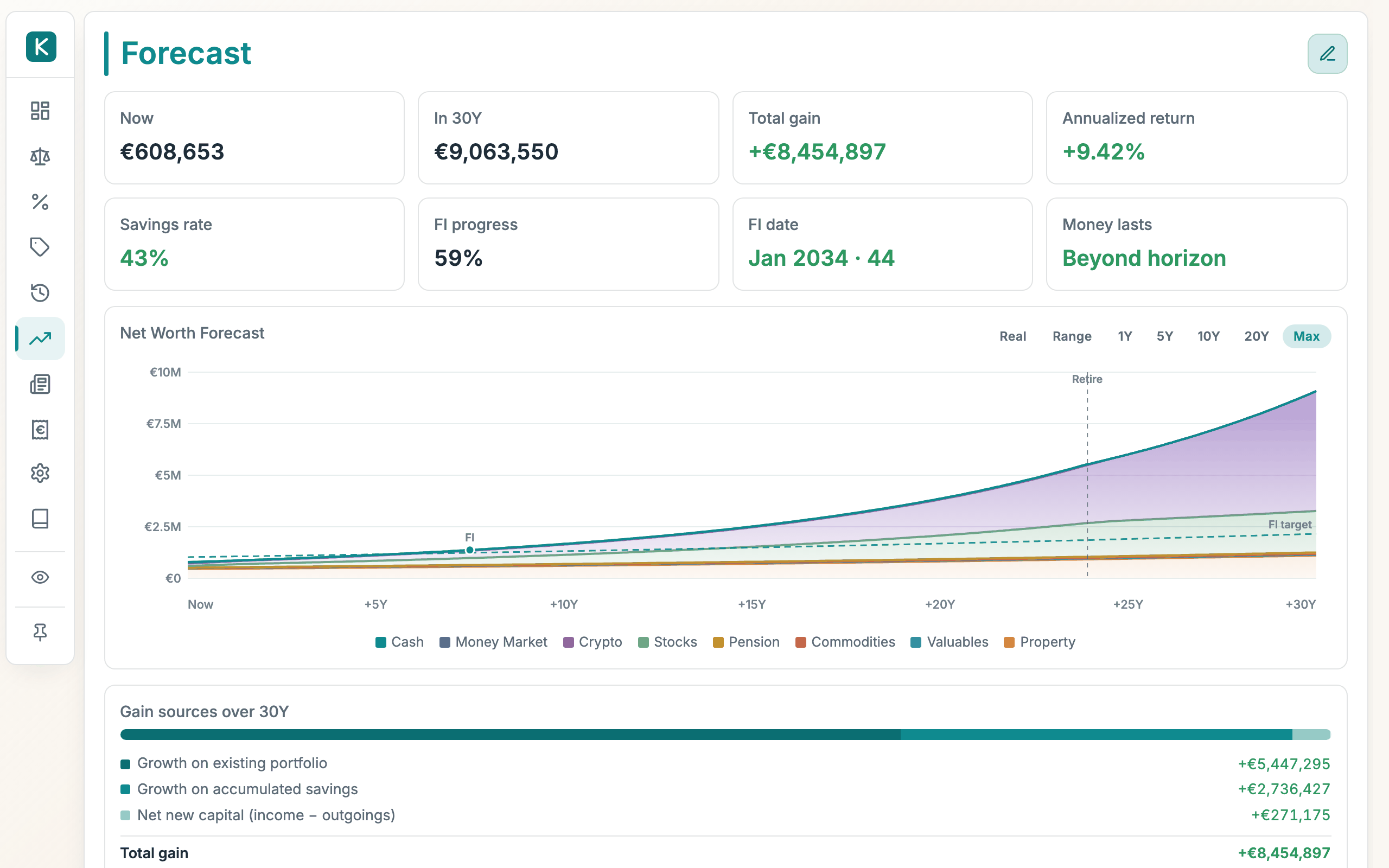
What the cards tell you
- Now / In XY / Total gain / Annualized return: where you are and where the visible range ends.
- Savings rate: the share of salary left after expenses and any loan payments.
- Stop-now progress: how big your portfolio is as a share of what it would need to be for you to stop today. 100% means you could stop now, which is exactly when Could stop reads Now.
- Could stop: the earliest month you could stop working and still not run out (with your age, if a birth year is set).
Both come from running the whole projection rather than from a rule of thumb, so your pension and the month it starts, a pot locked until an access age, committed loan payments and tax all count. That matters most when income arrives later than you stop: a pension covering most of your retirement means you never need a pot big enough to fund all of it alone, while retiring years before one starts means you need enough on top to bridge the gap. The FI number on the chart is still the classic spending divided by withdrawal rate, kept as a familiar reference line.
- Money lasts, for plans with a retirement date: how long the money holds out. Beyond horizon is the goal.
Under the cards the tab shows up to three short insights computed from your own assumptions, most important first: whether the plan is self-sustaining (and if not, when net worth peaks and starts declining), the monthly budget your settings can sustain indefinitely, whether your safe withdrawal rate outruns what those settings support, and what taxes cost the plan over the horizon. Every number is derived from the same engine that draws the chart; nothing is estimated separately.
Below the chart, two more cards break the projection down: Gain sources splits the projected gain over the visible range into growth on your existing portfolio, growth on your accumulated savings, and the net new capital you add; Rate math per year shows the same picture as yearly rates (each row a %/yr share of today's net worth, from portfolio growth to spending) adding up to the plan's net worth drift.
The chart
- The dashed FI target line rises with inflation (your future spending costs more); turn on Real to see everything in today's purchasing power. The target then sits flat.
- A vertical dashed marker shows your retirement month; a dot marks the FI crossing.
- Range switches from the single expected path to a Monte Carlo simulation: 500 market histories drawn from your growth and volatility assumptions. The band spans the 10th–90th percentile of outcomes, the line is the median, and the legend reports how many simulated markets your plan survives. The upper edge of very volatile plans is clipped. The planning-relevant parts are the median and the downside.
- Use the range chips (10Y … 75Y) to pick the window shown; the projection itself always runs 75 years.
What the ledger contributes automatically
- The projection starts from your current holdings. With nothing on your balance sheet there's nothing to project, so add a holding first.
- Mortgages amortize. Loan schedules pay themselves down month by month inside the projection; when a loan ends, its payment becomes visible extra savings.
- Recurring buys keep running, shifting cash into their target class every month.
- Interest-bearing cash grows at the blended rate of your interest-bearing lines unless you override the class rate.
Tax
By default the forecast is linked to your Tax settings (Settings → Tax): investment growth compounds gross, and capital-gains tax applies only when the plan actually sells (during retirement withdrawals) using your real cost basis, your rate, and your annual exemption. Interest-type yield is taxed as it accrues, like withholding. This is why a Belgian plan can fund much of its retirement almost tax-free: withdrawals whose realized gain stays under the exemption owe nothing. When your Tax settings include an exemption carry-forward (the Belgium preset prefills 1,000 euro per unused year, up to five years, so the exemption can reach 15,000), the projection models that too.
Tick Override with flat rate to use a single flat percentage on all growth instead: the simpler, more conservative model, and the only one available until a portfolio is configured under Settings → Tax.
Good to know
- Growth rates are assumptions, not advice. The defaults are deliberately conservative placeholders.
- Property counts as part of the portfolio in both the FI number and the two stop figures, and the plan will sell it last if spending outruns everything else. If you would never sell your home, treat the result as optimistic by roughly its value.
- When spending outruns income under the default strategy, the plan sells assets in a fixed order (money market first, then stocks, commodities, valuables, crypto, pension, property) and pays the resulting tax each year-end. A pension pot with an unlock month set is skipped until that month.
- Your assumptions save automatically, so they're waiting for you next time.
- Everything is in your ledger's base currency, like the rest of the app.