History
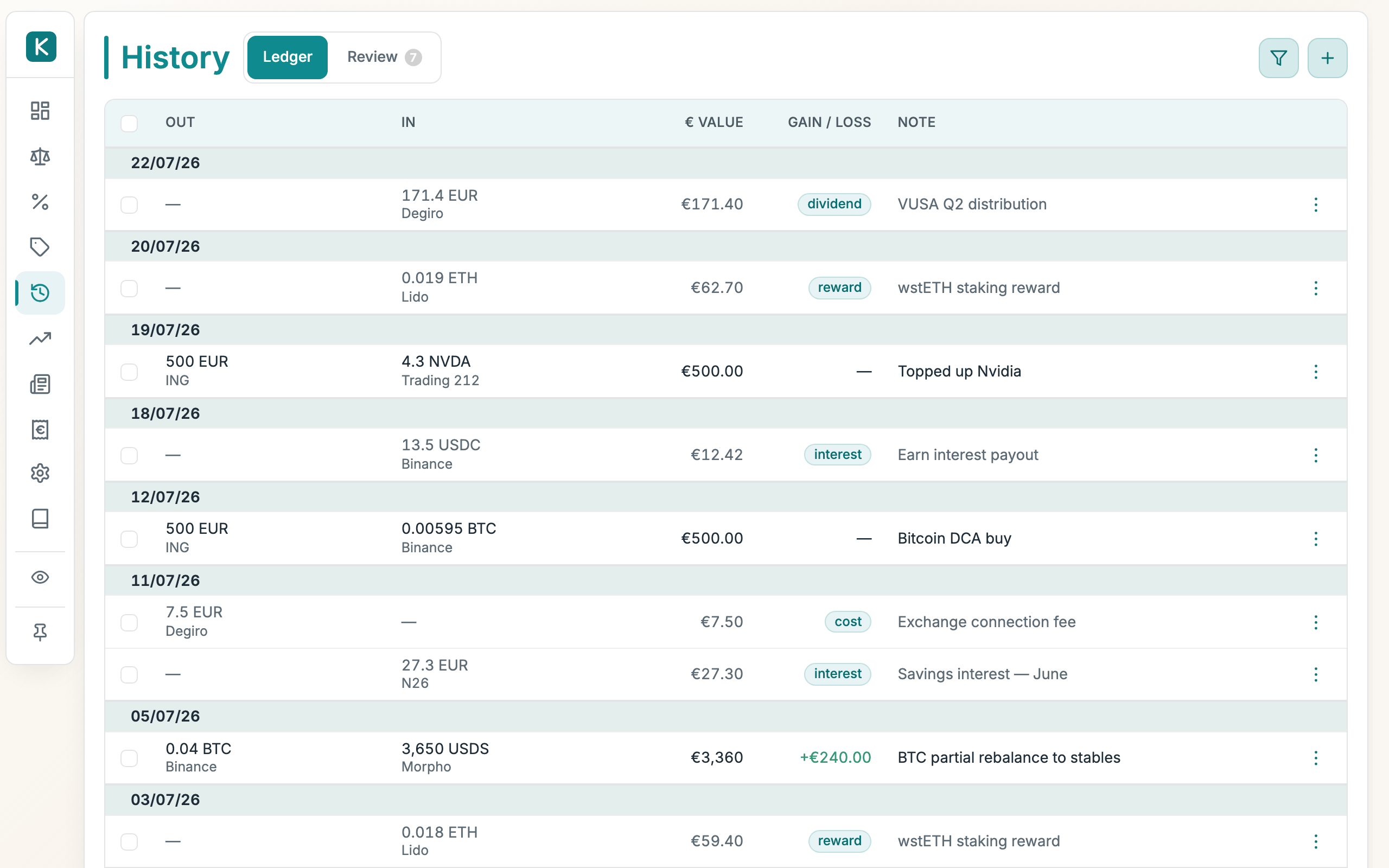
A complete list of every trade and balance adjustment you've recorded, newest first. Use it to review what changed, narrow down to a period or counterparty, and edit or delete a past entry.
How to use
- Open the History tab.
- Click Show filters to reveal the filter bar, then narrow by Portfolio, Class, Risk, Category, Provider, or Ticker.
- Set a Start date and End date to limit the time window. Both dates are included.
- Keep Hide empty on to leave out zero-value entries.
- Open a row's ⋯ menu and choose Edit. The trade form opens filled in so you can change and re-save it.
- Choose Delete from the same ⋯ menu to remove an entry.
- Click Show all to clear all filters (Reset restores your saved default view).
Good to know
- Select several rows (the checkbox column) and an Actions menu appears in the filter bar: apply a tax tag to all of them, exclude them from tax, clear their tags, merge them, or delete them in one go (after a confirmation: bulk deletes have no undo).
- Merge combines rows two ways. Select several trades with the same From, To, and date (e.g. an exchange order that executed as separate fills) and they collapse into a single trade with the summed amounts (the provider's event ids are all kept, so a later import won't re-add the original fills). Or select one negative and one positive adjustment to fold them into a single trade.
- After a single-row delete, an Undo link appears briefly so you can put the entry back.
- Editing replaces the original transaction rather than adding a copy. To back out mid-edit, use Cancel Edit on the trade form.
- Deleting a trade also removes its contribution to any implied price. If it was the only trade for a ticker, that price disappears from the Prices tab.
- Balance adjustments (manual quantity edits, sync deltas, imported deposits and yields) show greyed out; their row menu offers Edit (date, quantity, tax tag, € value and note) alongside the tax tags and delete. The Tag in the editor is the same tag the row menu applies (reward, interest, dividend, cost, or lost / stolen on a withdrawal), and the value field's label follows it: Cost on a plain deposit, Proceeds on a withdrawal, Value received once the row is tagged as income. Pick the tag first, then the value. The € value does double duty: it counts as money in/out for the P/L view (Invested/Realized) and as the units' tax cost basis, unless the row is tagged as income or cost, in which case its value stays in P/L. A value of 0 means the units were free (a known €0 basis, no income): leave the value blank instead if you don't know what they cost, and the row gets the no basis chip until you do. The position it belongs to can't be changed here; relink it from the connection instead.
- Narrow to a single position (or click a quantity on the Balance sheet) and the tab becomes that position's register: a strip with its totals, and a Position column with the running quantity (plus, with tax configured, the running cost basis) after every row. Cash positions show — for cost basis: cash is excluded from cost-basis tracking (see Tax).
- The list is paged at 50 rows per page. Use the filters to narrow a long history, and the pager at the bottom to move between pages.
Review queue
The Review subtab is a holding area for transactions pulled from a connected exchange, wallet, or fund before they touch your ledger. Nothing here counts until you keep it.
- A connection set to transactions mode (toggle on its card under Settings → Sources, or Sync now) stages each new event here as pending instead of adjusting balances directly. Connections left in balance mode keep auto-adjusting quantities nightly and never appear here.
- On a pending row you can keep it (posts to the ledger as a real trade or adjustment), dismiss it, merge two legs into a single trade or transfer, or reclassify its kind (buy, sell, swap, transfer, reward, interest, fee…) before it posts.
- The kind you choose is what the Tax engine reads, so classifying here is also how income vs. disposal gets decided.