Security & Privacy
How your financial data is protected, and who can reach it.
Your own isolated database
Krosos is not a shared database that everyone sits in together. Your data lives in its own database file with its own encryption keys. Your holdings, prices and transactions never share tables or storage with anyone else, and one account cannot see or reach another's data.
Sign-in is through Google. Only the single email address your account is set up for can sign in, and sessions are signed so they can't be forged.
Encryption in transit
All traffic between your browser and Krosos is served over HTTPS.
Encryption at rest
- Exchange & wallet API keys are encrypted with keys unique to your account (see API keys). Once saved they are never shown again, returned, or written to logs.
- Bank connection data, the session that lets Krosos read your balances plus the account details (IBAN, holder name) it returns, is encrypted at rest with your account's own key, the same way exchange keys are.
- Backups are encrypted before they reach storage. A consistent snapshot of your database is taken nightly and stored off-site for disaster recovery, but it is encrypted with your account's own key first, so the storage only ever holds unreadable ciphertext.
Passphrase encryption of amounts (desktop app only)
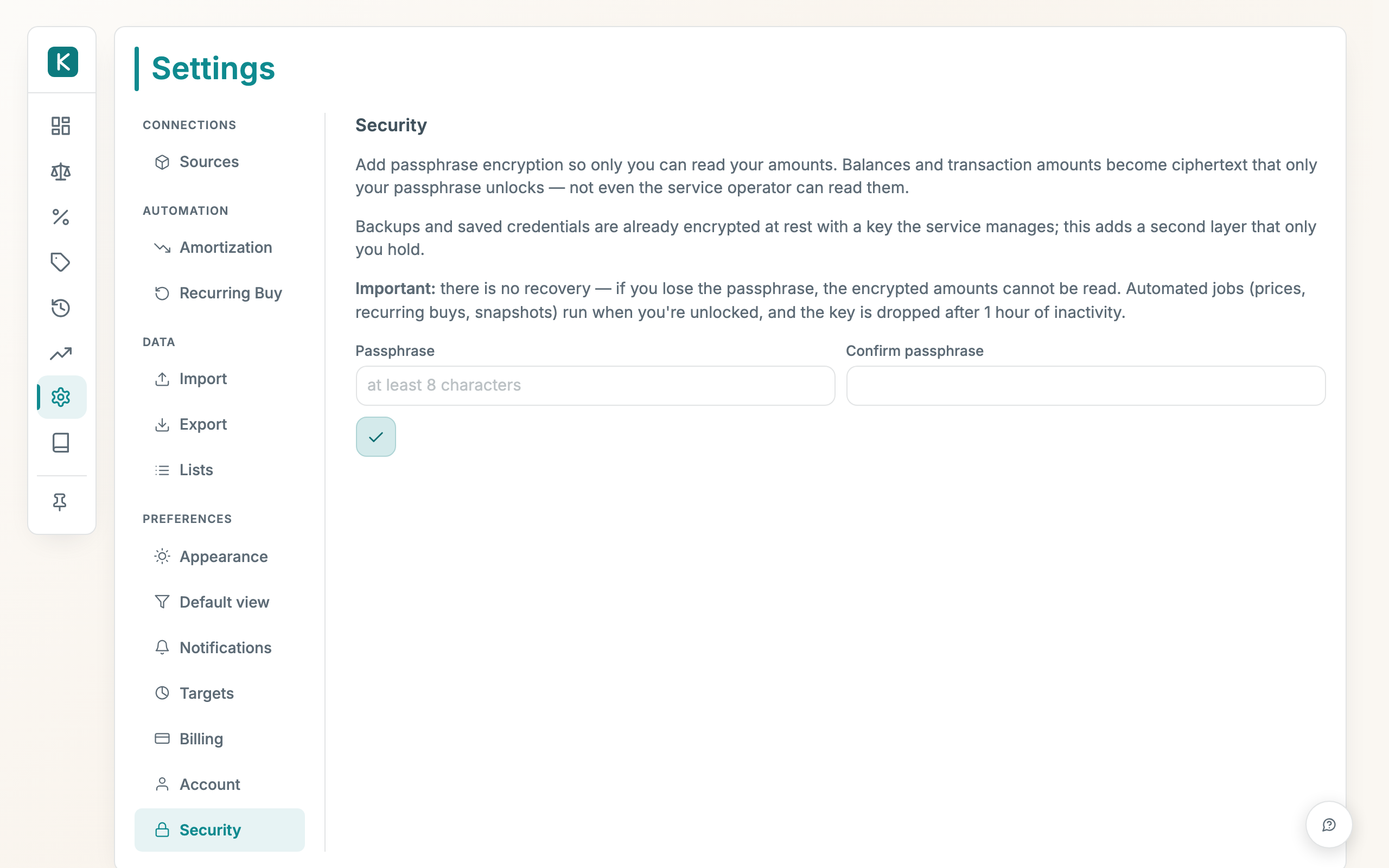
The desktop app, where Krosos runs entirely on your own machine, can add an extra layer on top of everything above. In Settings → Security on the desktop app, your monetary values (transaction amounts, position quantities and cost basis, net-worth snapshots, projection income and expenses, recurring-buy amounts, and amortization values) are encrypted with a key derived from a passphrase that only you know. The key is never written to disk; it lives in memory only while your session is unlocked.
What this protects: a stolen database file or backup shows no amounts without your passphrase. Before turning it on:
- No recovery. If you forget the passphrase, the encrypted amounts cannot be read. Keep it somewhere safe (at least 8 characters).
- Automation runs when you're unlocked. The nightly job (prices, recurring buys, snapshots) runs as usual if your session is unlocked, and otherwise catches up the next time you unlock.
- Idle auto-lock. The key is dropped after about an hour of inactivity, so you'll be asked for the passphrase again. Use Lock now to clear it immediately.
Use Disable encryption at any time (passphrase required) to decrypt your amounts back to plain numbers.
Bank connections
Bank links are made through Enable Banking, a regulated Account Information Service Provider licensed under the EU's open-banking rules.
- Read-only, balances only. The connection can read your account balances and nothing else. It cannot make payments, move money, or change anything at your bank. This is enforced by the open-banking standard, not just by us.
- You authorise it at your own bank. You approve the connection on your bank's own login screen, where Enable Banking's name appears as the licensed party talking to the bank.
See Bank connection setup to set this up.
Telegram bot (optional)
The Telegram bot is off until you turn it on, and is built so the connection stays yours alone:
- Your own bot, no shared service. You create the bot, so the token is yours. It is stored encrypted with your account's own key and never shown back to you, returned, or written to logs.
- Only your chat can use it. Messages are accepted only when they carry your account's private secret, and only the single chat you link, using a one-time code that expires after 15 minutes, can read your net worth or add trades. Every other chat is refused before any data is touched.
- Writes are confirmed. A trade or position change is shown for you to approve and is saved only when you tap Confirm, through the same checks as the web app.
- Plain-language entry stays on your terms. Free-text trade entry works only if you set an LLM key (defaulting to EU-hosted Mistral); without one, only slash commands work, and those calls are rate-limited. Remove the bot at any time and the token, link and secret are wiped.
Export & deletion
- Export. In Settings → Import & Export → Backup, Download backup downloads your full database to keep your own copy.
- Delete all data. The Delete all data control in the same panel takes you back to a brand-new install: your ledger (transactions, positions, connected sources, value schedules, recurring buys, targets, prices) and your settings (stored API keys, API tokens, custom lists, tax setup, sign-in history, preferences) are all permanently deleted. The one thing kept is your passphrase protection, so anything you enter next is still encrypted. Export a backup first.
- When you cancel, your database is deleted and its off-site backups are purged, so nothing lingers after you leave.
Where this sits
Your data is isolated per customer, encrypted in transit, and encrypted at rest. To compute your balances and fetch live prices, the service has to process your data on the server, so hosted Krosos is not end-to-end ("zero-knowledge") encrypted, like every other hosted finance app. What we commit to: we never sell or share your data, and we apply least-privilege access to the systems that run it. If you want a categorical "no one but me", use the desktop app: it runs entirely on your machine, and your data never leaves it.